
IPTV Portal URL: Easy Setup Guide and 7 Proven Fixes (2026)
An IPTV portal URL is the web address your MAG box or STB Emulator app uses to connect to your IPTV provider. You type it once in the device settings, the device sends its MAC address to that address, and the provider’s portal loads your channels, movies and TV guide. This guide explains what an IPTV portal URL looks like, where to enter it on each device, and how to fix the 7 most common portal errors.
What Is an IPTV Portal URL?
A portal URL is a link to a small web application (often called a Stalker or Ministra portal) that runs on your provider’s server. Instead of logging in with a username and password, the device identifies itself with its MAC address. If the provider has registered that MAC address, the portal opens and shows your subscription.
That is why a portal URL on its own is useless: it only works together with a MAC address that the provider has activated. It is also why two people can use the same IPTV portal URL and still see different packages.
What does an IPTV portal URL look like?
Most portal URLs follow the same pattern: a protocol, a domain or IP address, sometimes a port, and usually /c/ at the end.
http://portal.example.com/c/http://portal.example.com:8080/c/http://123.45.67.89/stalker_portal/c/
The addresses above are examples only. Your real portal URL comes from your provider, and you must type it exactly as you received it, including http:// and the final slash.
IPTV Portal URL vs M3U Link vs Xtream Codes
IPTV providers give you one of three login types. Which one you need depends on your device, not on the service.

| Login type | What you receive | Used on |
|---|---|---|
| Portal URL | One URL, linked to your device MAC address | MAG boxes, STB Emulator, some Formuler boxes |
| Xtream Codes API | Server URL + username + password | IPTV Smarters Pro, XCIPTV, TiviMate |
| M3U link | One long playlist URL | VLC, Smart TV players, Enigma2 |
If you use a Smart TV, Firestick, phone or PC, you normally do not need a portal URL at all. Follow our IPTV installation guides for IPTV Smarters Pro or XCIPTV instead.
A MAG box uses a portal, but most apps use a username and password instead. Our Xtream Codes guide covers that method, and the M3U playlist guide covers the third option.
How to Get Your IPTV Portal URL
You get your IPTV portal URL from the provider you subscribe to. With IPTVGG it works like this:
- Find the MAC address of your box. On a MAG box it is printed on the sticker under the device and starts with
00:1A:79. - Choose a plan on the plans page or request a 24-hour free trial, select MAG Box as your device and enter the MAC address at checkout.
- Our support activates your MAC address and sends you the portal URL on WhatsApp.
Do not use free IPTV portal URL lists. Lists of “free portal URLs and MAC addresses” shared on forums and social media use stolen or shared accounts. They stop working within days, they often lead to pages with malware, and they give you no support when something breaks. Read more in our guide Is IPTV legal?
Your provider also needs your device MAC address to activate the portal. Our guide on how to find your IPTV MAC address shows where it is on a MAG box and in STB Emulator.
How to Enter the IPTV Portal URL on a MAG Box
These steps work on MAG 250, 254, 256, 322 and 524. The menu names can differ slightly between firmware versions.

- Start the MAG box and open Settings (press the SETUP or SET button on the remote).
- Go to System settings and then Servers.
- Open Portals.
- In Portal 1 name, type any name, for example IPTVGG.
- In Portal 1 URL, type the IPTV portal URL you received. Check every character.
- Press OK to save, go back and choose Restart portal.
After the restart, the box connects to the portal and loads your channel list. Our MAG box setup guide shows the same steps with more detail.
How to Enter the Portal URL in STB Emulator
STB Emulator is an Android app that behaves like a MAG box. It is useful on an Android TV box or Firestick when your subscription is a portal subscription. For a full walkthrough, see our StbEmu setup guide.
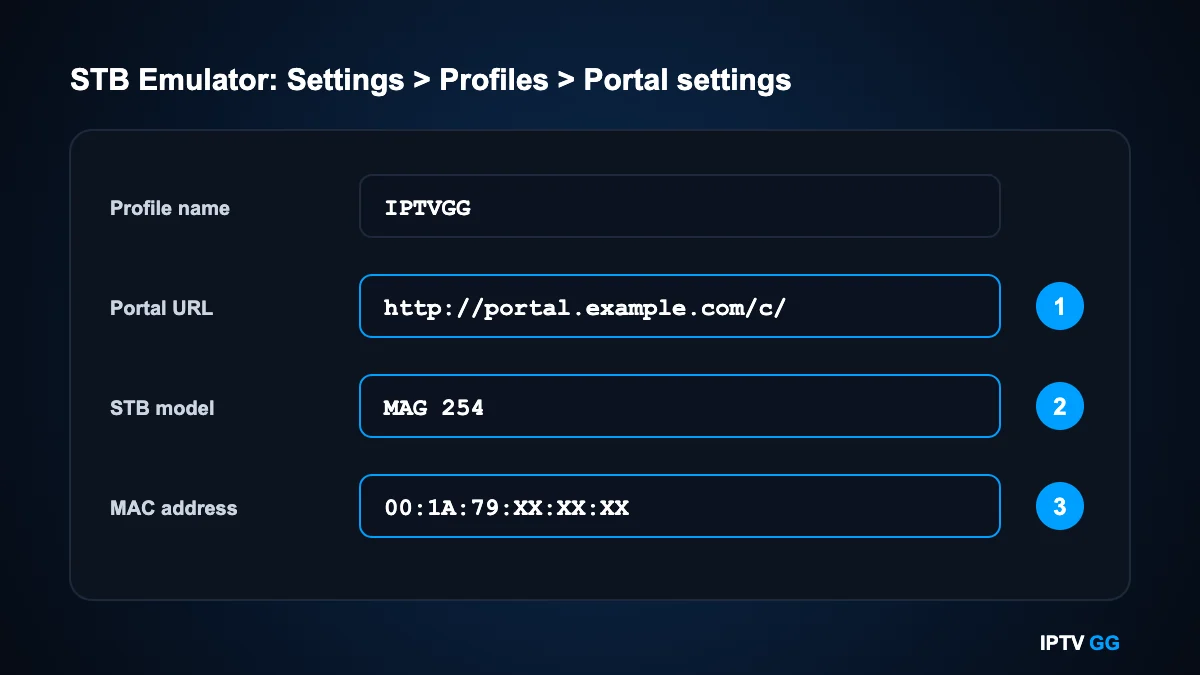
- Open STB Emulator and go to Settings, then Profiles.
- Select the default profile or add a new one, and give it a name.
- Open Portal settings and type your IPTV portal URL in Portal URL.
- Go back, open STB configuration and choose a MAG model (MAG 250 or MAG 254 work for most portals).
- Note the MAC address shown in STB configuration and send it to your provider, because this is the MAC address that must be activated.
- Exit the settings and restart the app.
7 Common IPTV Portal URL Errors and How to Fix Them

1. “Portal loading error” or “Page loading error”
The box cannot reach the address. Check the portal URL for typing mistakes first: a missing /c/, a comma instead of a dot or https instead of http are the usual causes. Then check that the box has internet access.
2. “STB blocked” or “Your STB is not supported”
The portal opened, but your MAC address is not active. Either the MAC address was registered with a typo, the subscription has expired, or you changed the device. Send your exact MAC address to your provider.
3. The portal loads, but the channel list is empty
Restart the portal and wait one minute for the list to load. If it stays empty, the account has no package attached and your provider needs to fix it.
4. The portal worked yesterday and not today
Restart the router and the box. If the error stays, ask your provider whether the portal address changed. Providers sometimes move to a new portal URL and send the new address to active customers.
5. Wrong date and time on the box
Some portals refuse the connection when the device clock is wrong. Set the time zone and NTP server in the system settings and restart.
6. Buffering after the portal has loaded
This is not a portal URL problem. Test your connection on Speedtest and use a cable instead of Wi-Fi when you can. Our IPTV internet speed guide lists the speed you need for HD and 4K.
7. Portal 1 is taken by another provider
A MAG box can store more than one portal. Enter the second address in Portal 2 name and Portal 2 URL, save and restart. The box then asks which portal to load at startup.
Checklist Before You Contact Support
If your IPTV portal URL still does not load after the fixes above, collect these details first. They let support find the problem in one message instead of five.
- The portal address exactly as you typed it in Portal 1 URL. A photo of the screen is the easiest way to share it.
- Your MAC address, copied from the sticker under the MAG box or from STB configuration in the app.
- The device model and firmware version, which you find in the device information screen in the settings.
- The exact error text on the screen, for example “STB blocked” or “Page loading error”.
- Whether other online apps work on the same box. If nothing loads, the problem is the internet connection and not the portal.
- How the box is connected: network cable or Wi-Fi, and whether you restarted the router.
Send these details to our support on WhatsApp. In most cases the cause is a single wrong character in the address or a MAC address that does not match the one registered for your subscription, and both are fixed in a few minutes.
MAG Portal or IPTV App: Which Should You Choose?
A MAG box with a portal starts straight into live TV and works with a simple remote, which many households prefer. An app such as IPTV Smarters Pro or XCIPTV logs in with a username and password, so you can move it to a new TV, phone or Firestick without changing a MAC address. If you already own a MAG box, use the portal. If you are buying a new device, an Android box or Firestick with an app is more flexible: see our XCIPTV Android guide.
Is It Safe to Share Your IPTV Portal URL?
The portal URL alone does not give anyone access, because the portal also checks the MAC address. Still, treat the URL and your MAC address as login details and do not post them in public groups. Anyone who copies both can use a MAC-cloning app to log in as you, and most portals then block the line for both devices.
Is There an IPTV Portal URL List You Can Just Copy?
People search for an IPTV portal URL list hoping one address will work on any box. It will not. A portal address belongs to one provider’s server, and that server only answers MAC addresses it already has on file. Copy an address from a public list and the box will show a loading error, open an empty channel list, or work for an hour until the owner rotates the address.
There is a safety side too. Pages that hand out free portals are a common way to spread modified apps and to collect the IP addresses of everyone who connects. If a page offers portals but asks you to install a file first, close it.
The only address worth entering is the one issued for your own MAC. We send it on WhatsApp once your line is created, and you can test the whole setup first with the 24-hour free trial, which needs no card.
IPTV Portal Login: Why There Is No Password
A MAG portal does not log in the way an app does. The box sends its MAC address with every request, and the IPTV portal URL you typed points to the server that checks that MAC against the provider’s list. Match found, the portal opens. No match, you get a blocked or unauthorised screen. That is the whole login.
This is why searching for an IPTV portal login password leads nowhere: on a MAG box the MAC address is the password. It also explains a common surprise. The line is tied to the box, not to you, so replacing the box means the provider has to register the new MAC before the portal will open again.
Apps work the opposite way. IPTV Smarters Pro and XCIPTV ask for a username, a password and a server address, so the same line follows you from a phone to a Firestick to a TV. If you expect to change devices often, an app is the easier route.
Portal URL, Host URL, Server Address: Same Thing, Different Labels
Device menus rarely agree on wording, which is why one guide says portal and the next says host. On a MAG box the field is called Portal 1 or Portal 2. In STB Emulator it sits under Profiles as Portal URL. Some Android portal apps label it Server URL or Host. Ministra, the current name for what used to be called Stalker Portal, is the software many of these addresses run on, which is where the /c/ at the end comes from.
Whatever the label, it takes the same value: the full address your provider gave you, typed exactly, including http:// or https://, any port number after the colon, and the trailing slash if there is one. A single missing character is the most common reason a portal refuses to load, so retype it rather than guessing.
Not every device accepts a portal at all. Samsung and LG TVs have no MAG portal, and neither does a plain Firestick, so those need an app and a username instead. Our installation guide shows which route each device takes.
IPTV Portal URL: Frequently Asked Questions
Where do I find my IPTV portal URL?
Your provider sends it to you after you order and give your MAC address. On a box that is already set up, you can read it under Settings, System settings, Servers, Portals.
Can I use an IPTV portal URL on a Smart TV?
Not directly. Samsung and LG TVs do not have a MAG portal. Use IPTV Smarters Pro with a username and password instead: see our Smart TV setup guide.
Can I use one portal URL on two devices?
Each device has its own MAC address, and a portal line is activated for one MAC address. If you want to watch on several screens at the same time, choose a plan for 2, 3 or 4 devices and tell our support which devices you use.
Why does my portal URL end with /c/?
The /c/ folder is where Stalker and Ministra portals keep the client interface. If your provider’s address includes it, you must type it too.
Do I need a VPN to use an IPTV portal URL?
No. A portal connection works on a normal internet connection. A MAG box also cannot run a VPN app itself, so a VPN would have to run on your router.
Next Step: Test It on Your Own Box
The fastest way to check that your box and your connection work with a portal is to try one. Request the IPTVGG 24-hour free trial, choose MAG Box at checkout and add your MAC address. Our support sends your IPTV portal URL on WhatsApp and helps you with the setup. Questions first? Read the IPTV FAQ or contact us.
Why does my IPTV portal URL stop working after a few days?
Two reasons are common. Either the address was taken from a public list and the owner changed it, or your subscription period ended and the provider removed your MAC from the portal. If you bought the line from us, message support on WhatsApp with your MAC address and we will tell you which of the two it is.
Can I change the portal URL myself without contacting support?
Yes. The portal field is an ordinary settings field on the box, so you can edit it whenever you like under Settings, System settings, Servers, Portals, then restart the box. What you cannot change yourself is which MAC addresses the provider allows, so a new address only helps if your MAC is registered on that server.
Does the IPTV portal URL affect picture quality or buffering?
The address itself does not. It only tells the box where to ask. Buffering comes from the connection between your home and the server, so a cable instead of Wi-Fi usually helps more than changing the portal. Our internet speed guide covers the numbers you need for HD and 4K.
Want to skip the portal troubleshooting?
Test a line that is already configured for your box. No card, login sent on WhatsApp.