
How to reach IPTVGG support
| Contact method | Details | Best for |
|---|---|---|
| +212 601 675807 | Orders, renewals and quick setup questions | |
| support@iptvgg.com | Account questions and anything you want in writing | |
| Contact form | The form above on this page | General questions and feedback |
What we can help with
- Orders and plans: choosing the right number of devices and plan length. Compare them on the plans page.
- Installation and setup: installing the app and logging in. Most answers are in our device setup guides.
- Login problems: errors such as “invalid username or password”.
- Playback issues: buffering or freezing channels.
- Renewals and refunds: see our refund policy.
Help us solve your issue faster
When you contact us, include:
- The device and app you use (for example Firestick with IPTV Smarters Pro).
- The exact error message, or a screenshot of it.
- The email address you used when ordering.
Never send your password in a message.
Before you contact us: 5 quick fixes
Many problems can be solved in two minutes. Try these steps first, and contact us if the problem stays:
- Restart the app and the device. Close the player completely, unplug the TV box or Firestick for 30 seconds and start again.
- Check your login details. Type the username, password and server URL again exactly as you received them.
- Refresh the channel list. In the app, use the reload or refresh option to download the latest channels and TV guide.
- Test your connection. Restart your router, or connect the device with a cable. Our IPTV internet speed guide explains how.
- Check your subscription date. If your plan has ended, the app cannot log in. Contact us to renew.
Contact us about your device
Tell us which device you use, so we can send you the right steps straight away:
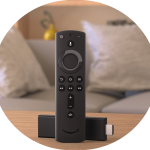 Firestick: most questions are about installing the app with Downloader. See the Firestick guide first.
 Smart TV: if the app is not in your TV’s store, we can suggest an alternative. See the Smart TV guide.
 Android and XCIPTV: player settings often fix playback problems. See the Android guide.
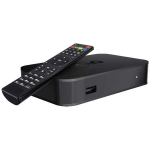 MAG box: send us your MAC address to activate the box. See the MAG box guide.
Contact us on WhatsApp
WhatsApp is the fastest way to reach IPTVGG support for orders and renewals. Save our number in your contacts, open a chat and describe your question in one message. If you do not have WhatsApp yet, you can download it from the official WhatsApp website. Prefer email? Write to us and include the email address you used when ordering.
Contact us about orders and renewals
You can contact us to order a new plan, add devices, or renew before your subscription ends. Tell us the plan length and the number of devices you want, and we will explain the next steps. We also send a reminder by email or WhatsApp before your subscription expires, so you have time to decide. Resellers can contact us in the same way for help with credits or their reseller panel.
What happens after you contact us
- We read your message and check your account details, if you are already a customer.
- We ask for missing information, such as your device, app or a photo of the error, only when we need it.
- We send clear steps to solve the issue, or we fix it on our side if the problem is with a channel or your account.
- We confirm with you that everything works before we close the conversation.
Feedback and suggestions
Your feedback helps us improve. If a channel you want is missing, a guide is unclear, or you have an idea for a new feature, contact us and tell us about it. We read every message and use the most common questions to update our guides and the IPTV FAQ. Business questions, such as partnerships or reseller requests, can be sent the same way; please mention the topic in the first line of your message so it reaches the right person quickly.
Support FAQ
How quickly will I get a reply?
It depends on the question, but a standard reply time can be a few minutes.
I paid but did not receive my login details. What should I do?
After you confirm your order, login details are sent by WhatsApp and email. Check your spam folder first, then message us on WhatsApp with your order email.
Can I place an order here?
Orders are placed from the plans page: the BUY NOW button opens the checkout form, then you confirm on WhatsApp. You can also request a free trial first.
Can you help me choose a device?
Yes. Contact us with your TV model and we will suggest the easiest option, for example a Firestick or the app on your Smart TV.
Can I contact IPTVGG support before I order?
Of course. Ask about channels, devices or plans before you buy, so you know exactly what you get.