
Want to watch your IPTVGG subscription on the big screen without extra boxes or cables? IPTV Smarters Pro is one of the easiest IPTV players to use on a Smart TV. This guide to IPTV Smarters Pro on Smart TV shows you how to install it on Samsung, LG and Android / Google TV models, how to log in with your subscription details, and how to fix the most common problems.
Time needed: about 5–10 minutes
What you need: a Smart TV connected to the internet, your TV remote, and your IPTVGG login details (username, password and server URL sent to you after subscribing).
Quick overview
| TV brand | Where to get the app | Difficulty |
|---|---|---|
| Samsung (Tizen) | Samsung Smart Hub / Apps | Easy |
| LG (webOS) | LG Content Store | Easy |
| Sony, TCL, Philips, Hisense (Android / Google TV) | Google Play Store | Very easy |
Tip: app availability in TV stores can change depending on your country and TV model. If you can’t find IPTV Smarters Pro, see the “App not found” section below.
How IPTV on a Smart TV works
 A Smart TV already has everything it needs to play IPTV: an internet connection, an app store and a remote. You install a player app, in this case IPTV Smarters Pro, and log in with the details from your IPTVGG subscription. The app then loads your live channels, movies and series directly on the TV, without an extra box or cable.
If something does not work, the cause is almost always in one of three places: the Smart TV (software version, storage or network connection), the app (version and login details) or your subscription (active and within the number of devices in your plan). The sections below help you check each of these.
Samsung, LG and Android TV at a glance
Each Smart TV brand uses its own operating system and app store. Use this table to find the right store on your TV:
| Smart TV | Operating system | App store on the TV | Section in this guide |
|---|---|---|---|
| Samsung | Tizen | Samsung Apps (Apps) | Samsung Smart TV |
| LG | webOS | LG Content Store | LG Smart TV |
| Sony, Philips, TCL and others with Android | Android TV / Google TV | Google Play Store | Android TV / Google TV |
If you are not sure which system your TV uses, open the TV settings and look for an “About” or “Support” section. It shows the model and software version.
Why watch IPTV directly on your Smart TV?
Installing IPTV Smarters Pro on the Smart TV itself means one remote, no extra device to power and no HDMI input to switch. It is the tidiest setup for a living room. The TV also handles picture processing for its own screen, so channels in HD and 4K look as the TV maker intended. The only limit is the app store: if your Smart TV model does not offer IPTV Smarters Pro, a Firestick or Android box gives you the same app on the same screen.
Before you start
- Check your internet speed. We recommend at least 15 Mbps for HD and 25 Mbps for 4K. Use an Ethernet cable if possible; it is more stable than Wi-Fi.
- Update your TV software. Samsung: Settings → Support → Software Update. LG: Settings → General → About This TV → Check for Updates.
- Have your login details ready. Don’t have them yet? Start your free trial or see our plans.
How to install IPTV Smarters Pro on Samsung Smart TV
- Press the Home (or Smart Hub) button on your Samsung remote.
- Go to Apps and select the search icon.
- Type “IPTV Smarters Pro” and select the app from the results.
- Click Install and wait for the download to finish.
- Open the app, accept the terms, then follow the login steps below.
How to install IPTV Smarters Pro on LG Smart TV
- Press the Home button on your LG remote.
- Open the LG Content Store (called Apps on newer models).
- Search for “IPTV Smarters Pro”.
- Select the app and click Install.
- Open it from your home screen, then follow the login steps below.
How to install IPTV Smarters Pro on Android TV / Google TV
This works on most Sony, TCL, Philips, Hisense and Xiaomi TVs running Android TV or Google TV.
- Open the Google Play Store on your TV.
- Search for “IPTV Smarters Pro”.
- Click Install, then Open.
- Follow the login steps below.
Using an Amazon Fire TV Stick instead? Follow our Firestick installation guide.
How to log in with your IPTVGG subscription
- Choose “Login with Xtream Codes API”. It is the fastest and most reliable option.
- Fill in the fields:
- Any name: type anything, for example IPTVGG
- Username: from your welcome message
- Password: from your welcome message
- URL: the server URL from your welcome message (copy it exactly, including
http://and the port number if there is one)
- Click Add User.
- Wait while the app loads Live TV, Movies and Series. The first load can take 1–2 minutes.
- Select your profile and start watching.
Tip: typing with a TV remote is slow. Double-check every character; one wrong letter in the URL is the most common reason login fails.
What you can do with IPTV Smarters Pro on your Smart TV
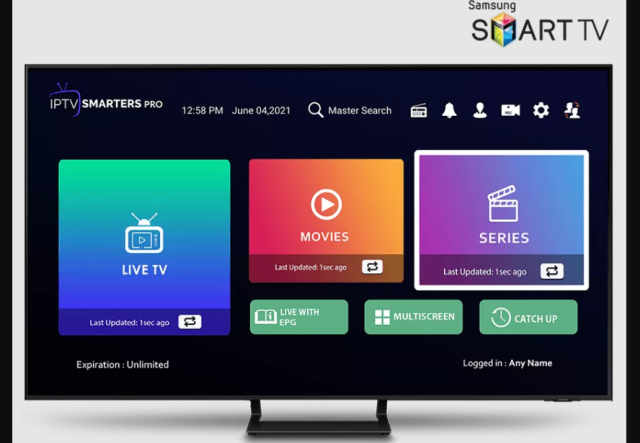
After you log in, the main screen of IPTV Smarters Pro gives you access to everything in your subscription:
- Live TV: live channels grouped by country or category. Choose a group, then a channel.
- Movies and Series: on-demand titles you can start, pause and resume with the Smart TV remote.
- Catch Up: on supported channels, programmes that were already broadcast.
- TV guide (EPG): the programme schedule for live channels.
- Favourites and search: save the channels you watch most and find titles quickly.
- Parental control: lock categories with a PIN in the app settings.
With the Smart TV remote, the arrow keys move through the menus, the OK button opens a channel and the up and down keys change channel during live playback.
Best Smart TV settings for smooth IPTV
A few changes on the TV itself make IPTV Smarters Pro run more smoothly:
- Update the TV software. On Samsung go to Settings → Support → Software Update. On LG go to Settings → General → About This TV and check for updates. On Android TV or Google TV go to Settings → System → About → System update.
- Use a wired connection if you can. Most Smart TVs have an Ethernet port. A cable gives a more stable picture than Wi-Fi, especially for 4K and live TV.
- If you use Wi-Fi, choose 5 GHz. Connect the TV to the 5 GHz network of your router and keep the router in the same room or close to it.
- Close apps you are not using. Smart TVs have limited memory. Restarting the TV (fully off at the power button, not only standby) clears it.
- Check motion settings for fast scenes. Motion smoothing (for example Auto Motion Plus on Samsung or TruMotion on LG) is a personal choice. If fast motion looks unnatural, try turning it down.
For more on connection quality, read our guide on how much internet speed IPTV needs.
How to update IPTV Smarters Pro on your Smart TV
Because IPTV Smarters Pro is installed from the official app store on your Smart TV, updates arrive through that store. On most TVs automatic app updates are turned on by default. If the app asks you to update, or if a feature stops working, open the app store on your TV, find IPTV Smarters Pro and choose Update. Your login details are normally kept after an update. You can check news and versions on the official site at iptvsmarters.com.
Smart TV or streaming stick?
Using the app directly on a Smart TV is the simplest setup. A streaming stick can still be the better option in some cases:
| Situation | Best option | Guide |
|---|---|---|
| Your Smart TV has IPTV Smarters Pro in its app store | Install the app on the Smart TV | This guide |
 The app is not in your TV store, or the TV is old and slow The app is not in your TV store, or the TV is old and slow | Use an Amazon Firestick | Firestick guide |
 You prefer an Android box or phone You prefer an Android box or phone | Use XCIPTV Player | Android guide |
Watching IPTV on more than one Smart TV
You can install IPTV Smarters Pro on several Smart TVs and log in with the same details. The number of screens that can watch at the same time depends on your plan: IPTVGG plans are available for 1, 2, 3 or 4 devices. If a second TV shows an error while another screen is playing, you have probably reached the limit of your plan. See the options on our plans page.
Checklist before contacting support
- The Smart TV is connected to the internet and other streaming apps work.
- Your IPTVGG subscription is active and you use the latest login details we sent.
- Username, password and URL are typed exactly, with no extra spaces.
- The TV and your router have been restarted.
- IPTV Smarters Pro and the TV software are up to date.
Still stuck? Contact our support team with your TV brand and model, the app version and the exact error message. You can also see all IPTV installation guides or read the IPTV FAQ.
Setting up the TV guide and favourites on your Smart TV
The TV guide (EPG) shows what is on now and next for each live channel. After logging in, open the home screen of IPTV Smarters Pro and choose the option to install or update the EPG. Loading can take a minute the first time. If the guide stays empty for some channels, it usually means that channel does not provide programme information, not that something is wrong with your Smart TV.
To build your own channel list, open Live TV, highlight a channel and use the options or long-press OK on your remote to add it to Favourites. Your favourites then appear in their own group at the top, so you do not need to scroll through every category each time you turn on the TV.
How to reinstall IPTV Smarters Pro on a Smart TV
Reinstalling the app often fixes problems that remain after a restart and an update:
- Samsung: open Apps, choose the settings icon, select IPTV Smarters Pro and choose Delete. Then install it again from Samsung Apps.
- LG: press the Home button, highlight IPTV Smarters Pro, press the up arrow to enter edit mode and remove the app. Then install it again from the LG Content Store.
- Android TV / Google TV: go to Settings → Apps, select IPTV Smarters Pro and choose Uninstall. Then install it again from the Google Play Store.
After reinstalling, log in again with your IPTVGG details and reload the TV guide.
Keep your login details private
Your username, password and server URL give access to your subscription. Do not share them outside your household, and never type them into apps or websites you do not trust. If you think someone else is using your details, contact us so we can help.
How to clear the app cache on your Smart TV
Clearing the cache removes temporary files and often fixes slow menus, freezing channels or an app that closes by itself. Your login is normally kept.
- Android TV / Google TV: go to Settings → Apps, select IPTV Smarters Pro and choose Clear cache.
- Samsung (newer models): go to Settings → Support → Device Care → Manage Storage, select IPTV Smarters Pro and choose Clear cache. On older models, turn the TV fully off at the plug for a minute instead.
- LG: webOS does not offer a per-app cache option. Turn the TV off completely, or reinstall the app as described above.
If clearing the cache does not help, restart your router as well, because many Smart TV streaming problems come from the home network rather than the TV.
Is it safe to install IPTV Smarters Pro from my Smart TV store?
Yes. When you install the app from the official store on your Samsung, LG or Android TV, it comes through the TV maker’s own app platform. Avoid installing player apps from unknown websites or USB files on a Smart TV.
Troubleshooting IPTV Smarters Pro on Smart TV: common problems and fixes
“App not found” in the store
Some TV models or regions don’t list IPTV Smarters Pro. You can use an Android TV box or Amazon Fire TV Stick plugged into your TV (see our Firestick guide), or contact us and we’ll tell you which player works best for your model.
For every option in detail, read our guide on what to do when IPTV Smarters is not available on Samsung or LG.
“Invalid username or password” / authorization failed
- Check for extra spaces before or after your username and password.
- Make sure the URL is copied exactly as we sent it.
- Check that your subscription is still active.
Channels are buffering or freezing
- Restart your router and TV.
- Switch from Wi-Fi to an Ethernet cable.
- In the app, go to Settings → Player Selection and try another player.
- Pause other devices that are streaming or downloading on the same network.
The channel list is empty or not updating
- In the app settings, refresh Live TV, Movies and Series.
- Log out and log back in.
Still stuck? Contact our support team.
Frequently asked questions
Is IPTV Smarters Pro free?
The IPTV Smarters Pro app is a player you can download from your TV’s app store. It does not include any channels; you need an IPTV subscription to watch content.
Which Samsung and LG TVs are compatible?
Most recent Samsung Smart TVs running Tizen and LG Smart TVs running webOS support the app. Older models may not show it in the store; in that case, use a Firestick or Android box.
Can I use the same subscription on my TV and my phone?
It depends on your plan. Each plan includes a set number of connections. Check the details on our plans page.
What internet speed do I need for 4K?
We recommend at least 25 Mbps for smooth 4K streaming, and 15 Mbps for HD.
Do I need a VPN?
A VPN is not required for the app to work. Some users choose to use one for privacy.
Does IPTV Smarters Pro work on Sony, Philips, TCL or Hisense Smart TVs?
If your Smart TV runs Android TV or Google TV, which many Sony, Philips, TCL and some Hisense models do, follow the Android TV / Google TV section of this guide and install the app from the Google Play Store. If your TV uses another system and the app is not available, use a Firestick instead.
Will I need to log in again every time I turn on the Smart TV?
No. IPTV Smarters Pro normally remembers your login, so the app opens directly on your channels. You only need to log in again after reinstalling the app or if your login details change.
Why does the picture look worse on my Smart TV than on my phone?
A large Smart TV screen shows every detail, so a weak connection is more visible. Use a wired connection or 5 GHz Wi-Fi, and check that the channel is available in HD or 4K.
Can I use a USB keyboard to type my login on the Smart TV?
On many Samsung, LG and Android TV models you can plug a USB keyboard into the TV and use it on the login screen. This makes typing the server URL easier. If your TV does not recognise the keyboard, use the on-screen keyboard with the remote.
Why does the app say my subscription has expired?
The app shows this when the login details are no longer active. Check the expiry date in the app account section, and renew your subscription if needed. We also contact you by email or WhatsApp when your subscription is about to expire.
Ready to start watching?
Install IPTV Smarters Pro, log in with your details, and enjoy your channels on the big screen in minutes.
See IPTVGG plans · Get a free trial
Other installation guides
- IPTV on Amazon Firestick
- IPTV Smarters on Apple devices
- IPTV Smarters Pro on Windows
- XCIPTV on Android
- MAG Box setup
- Back to all installation guides
App installed? Now you need a line.
Get a free 24-hour login on WhatsApp and see how it runs on your own Smart TV.