
IPTV FAQ

FAQ

IPTV FAQ: Frequently Asked Questions

What is IPTV?

IPTV is the next-generation television technology. Switch your TV setup from traditional cable or satellite TV to the latest Internet Protocol television. Subscribe to get access to live TV channels from around the world and movies and series on demand.

What does the package include?

When you subscribe to IPTVGG, you get access to live TV channels from around the world, movies and series on demand, as well as TV shows.

What types of devices are supported?

Our IPTV service is accessible on almost all devices. You can enjoy our service on any smart TV (Samsung, Sony, LG, etc.), all Android devices (STB, phone), Apple TV, iPhone, STB emulator app, Fire Stick.

How many devices can I use at the same time?

It depends on your plan. We offer subscriptions for 1, 2, 3 or 4 devices watching at the same time. Choose the number of screens you need on our plans page.

How do I install my IPTV subscription?

After you have made the payment for your IPTV subscription, we will send you your login details and installation instructions by WhatsApp and email for the IPTV subscription for all media (Smart IPTV / Android Box / Computer / Mac / Smartphone / Apple TV) / Tablet / iPad / Mag).

When will my IPTV subscription take effect?

The subscription takes effect from the moment you receive your activation credentials by WhatsApp and email. For example: Haley subscribed for a three-month period at 23:55 on February 17 and received the activation voucher at 00:10 on February 18. Haley’s subscription will be available from 00:10 on February 18 for the next 3 months.

How will I receive my subscription?

After you confirm your order and payment with support on WhatsApp, your login details are sent by WhatsApp and email.

What is the typical response time for a support question?

Since you reported a support question to us, we are doing our best to understand what is happening. Depending on the case, this could take more or less time, however, a standard time could be a few minutes.

Will you automatically renew my subscription?

We will contact you by email or WhatsApp to renew your subscription once it is about to expire.

Will this work in my country?

Absolutely, you can watch IPTV from anywhere in the world, but you will need to ensure that your internet speed is sufficient to watch the channels without any issues.

Can I try IPTVGG before I buy?

Yes. You can request a free trial to test the channels, picture quality and stability on your own device before you order. Request it on our free trial page.

Can I get a refund?

Yes. You can request a refund within 24 hours of activation by contacting our support team. Read the full details in our refund policy.

More IPTV FAQ: apps, devices and streaming quality

This part of our IPTV FAQ covers the questions we hear most often after the installation: which app to use, how fast your internet should be, and what to do when the picture freezes.

FAQ: which app is best for IPTV?

IPTV FAQ: IPTV Smarters Pro appIPTV Smarters Pro is the most popular choice and works on Firestick, Android, Smart TV, Windows and Apple devices. On Android, XCIPTV is a good alternative. Both use the same login details. See our installation guides.

FAQ: what internet speed do I need?

About 10–15 Mbps per HD stream and about 25 Mbps per 4K stream. Test your speed on the TV device itself, for example with Speedtest. Our IPTV internet speed guide explains the details.

FAQ: why is my IPTV buffering?

In most cases the cause is weak Wi-Fi near the TV, not the service. Use an Ethernet cable or 5 GHz Wi-Fi, restart your router, and pause large downloads while you watch. If only one channel freezes, report it to our support team.

FAQ: can I watch in 4K?

Yes, many channels and movies are available in 4K. You need a 4K TV or 4K device, such as a Firestick 4K, and a stable connection of about 25 Mbps.

FAQ: does IPTV work on a MAG box?
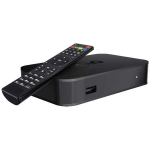
IPTV FAQ: MAG box setupYes. MAG boxes are activated with their MAC address, and you only enter a portal URL. Follow our MAG box guide.

FAQ: can I watch at my cabin or when travelling?

Yes, anywhere with a stable internet connection. Install the app on a phone, tablet or Firestick and log in with the same details. Each device that plays at the same time uses one connection from your plan.

FAQ: can I watch on my iPhone, iPad or Windows PC?

IPTV FAQ: iPhone and Apple TVYes. Use the Apple version of the player on iPhone, iPad and Apple TV, as shown in our Apple guide.
IPTV FAQ: Windows PCOn a Windows PC or laptop, install the Windows version of IPTV Smarters Pro and log in with the same details. Follow the Windows guide for every step.

FAQ: do I need a VPN?

Usually not. A VPN can lower your speed and add delay, so try without one first.

FAQ: how do I refresh the channel list in the app?
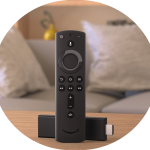
IPTV FAQ: Firestick app settingsOpen the app settings or the dashboard and choose the reload or refresh option. New channels and the latest TV guide appear after a minute or two.

FAQ: is IPTV legal?

IPTV as a technology is legal. What matters is whether a provider has the rights to the content it offers. Read more in our guide FAQ: is IPTV legal?

FAQ: where can I find more help?

Browse the IPTVGG blog for detailed guides, check the plans, compare the plans, or contact our support team.

Still have questions?

Follow a step-by-step guide for your device or talk to our support team.