
Have a MAG box (MAG 250, 254, 256, 322, 324, 420, 524 and others)? Setting up IPTV on MAG box is simple: we activate your subscription using your box’s MAC address, then you add one portal URL in the settings. This guide walks you through every step, from finding your MAC address to fixing the most common errors. New to portals? Read our IPTV portal URL guide first.
Time needed: about 10 minutes
What you need: a MAG box connected to your TV and to the internet, the remote control, and an active IPTVGG subscription.
What is a MAG box?
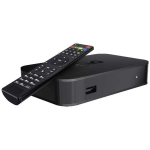 A MAG box is a dedicated IPTV set-top box made by Infomir. Unlike a Firestick or an Android TV box, it does not use apps from a store. Instead, the MAG box connects to a single portal: a web address that loads the channel list, the TV guide and the movie library directly on the box. That is why IPTV on a MAG box needs only two things: an activated MAC address and a portal URL.
Many viewers like the MAG box because it is simple. It starts straight into the TV portal, the remote is designed for live TV, and there is no app to update or log in to. Once the portal is saved, family members can switch channels just like with a classic cable box.
MAG box vs app-based setup
| How you log in | MAC address + portal URL | Username, password and server URL |
| What you type on the device | Only the portal URL | Three login fields |
| Where it runs | Only on the MAG box | Phones, tablets, TV boxes, Smart TVs |
| Changing device | Send us the new MAC address | Log in again on the new device |
If you prefer an app on another device, see our installation guides for Firestick, Android, Smart TV, Windows and Apple.
How MAG activation works
| Step | Who does it |
|---|---|
| 1. Send us your order number and MAC address | You |
| 2. Activate the MAC address on our server | IPTVGG (remotely) |
| 3. Send you your portal URL | IPTVGG |
| 4. Enter the portal URL on your MAG box | You (steps below) |
MAG boxes don’t use a username and password. Your subscription is linked to the box’s MAC address, so there’s nothing to type except the portal URL.
Step 1: Find your MAC address
You can find it in two places:
- On the sticker on the back or bottom of the box. It looks like
00:1A:79:XX:XX:XX. - On the screen: go to Settings → System settings → Device info (or Status, depending on your model).
Send your order number and MAC address to our team via our contact page. Once activated, we’ll send you your portal URL. Don’t have a subscription yet? See our plans.
Step 2: Open the portal settings
- Turn on the MAG box. When the main portal screen appears, click Settings (or press the SETUP/SET button on your remote).
- Select System settings.
- Select Servers.
- Select Portals.
Step 3: Enter your portal URL
- In Portal 1 name, type any name, for example IPTVGG.
- In Portal 1 URL, type the portal URL we sent you, exactly as written (including
http://, the port number and the final/c/if there is one). - Leave Portal 2 empty unless we tell you otherwise.
- Press OK to save.
Tip: typing with the MAG remote is slow. Double-check every character; one wrong letter or a missing slash is the most common reason the portal doesn’t load.
Step 4: Reboot the box
- Press EXIT on the remote to leave the settings.
- Go back to Settings and choose Restart portal or Reboot device, then confirm with OK.
- After the reboot, the box loads the IPTVGG portal and your channel list appears.
Using the IPTVGG portal on your MAG box
After the reboot, the portal opens with a main menu. The exact look depends on your MAG model and firmware, but you will usually find these sections:
- TV: all live channels, sorted into groups by country and category. Select a group, then a channel, and press OK to watch.
- Video club / Movies: the on-demand movie library included in your subscription.
- Series: TV shows sorted by title, season and episode.
- TV guide: the programme guide that shows what is on now and next.
Use the arrow keys to move, OK to open, and EXIT or BACK to return. The coloured buttons on the remote open extra options such as sorting, searching or adding a channel to your favourites. Their function is shown at the bottom of the screen in most portals.
Save your favourite channels on the MAG box
Long channel lists are easier to use with favourites. Open the TV section, highlight a channel, and use the favourite option shown at the bottom of the screen (often one of the coloured buttons). A star or mark appears next to the channel. You can then open the Favourites group to see only the channels you watch every day. Favourites are saved on the portal, so they stay after a reboot.
Recommended MAG box settings
A few settings make a big difference to picture quality and to the TV guide. You find them in Settings on the MAG box. Menu names can change slightly between models and firmware versions.
| Video output resolution | Settings → Video (or Video settings) | The native resolution of your TV, for example 1080p, or 4K on MAG models that support it |
| Time zone | Settings → System settings → Advanced settings (or Date and time) | Your local time zone, so the TV guide shows the right times |
| Network connection | Settings → System settings → Network | Ethernet (wired) whenever possible |
| Portal 1 URL | Settings → System settings → Servers → Portals | The portal URL we sent you, typed exactly |
If the picture looks stretched or has black borders, check the aspect ratio option in the video settings and match it to your TV.
MAG box internet connection: cable or Wi-Fi?
A wired Ethernet cable is the best choice for a MAG box. It gives a stable connection and avoids most buffering. Some models, especially older MAG 250 and 254 versions, have no built-in Wi-Fi at all, so they need a cable or a compatible USB Wi-Fi adapter. Newer models may include Wi-Fi; check the specifications of your box.
As a general guide, HD channels need a steady connection of around 10 Mbps, and 4K content needs more, around 25 Mbps or higher. You can check your speed on another device connected to the same router with Speedtest.
Updating the MAG box software
Infomir releases firmware updates for MAG boxes that fix bugs and improve playback. On most models, go to Settings → Software update (sometimes under System settings), choose the update method offered by your box, and follow the steps on screen. Do not turn the box off while it is updating. After the update, check that your portal URL is still saved in Portal 1.
More information about MAG models and firmware is available on the Infomir website.
Factory reset: when and how
A factory reset is the last step when the MAG box is very slow, freezes on start-up, or the settings are mixed up. It erases your settings, including the portal URL, but it does not change the MAC address. That means your IPTVGG activation stays valid: after the reset, you only need to enter the portal URL again and reboot.
The reset option is usually found in Settings → System settings as “Reset settings” or “Factory reset”. Write down your portal URL before you start.
Portal 1 and Portal 2
The Portals menu on a MAG box has fields for more than one portal. The box normally loads Portal 1 first. Put the IPTVGG portal URL in Portal 1. If you also use another portal, you can place it in Portal 2 and switch between them from the settings. Leaving an old or wrong address in Portal 1 is a common reason why the box shows the wrong channel list.
MAG box compared with other devices
| MAG box | MAC address + portal URL | Simple, TV-only use with a dedicated remote |
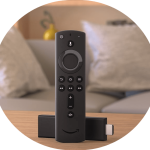 Amazon Firestick Amazon Firestick | Username + password in an app | Small, portable and easy to move between TVs |
 Android TV box Android TV box | Username + password in XCIPTV or Smarters | Flexible use with many apps |
 IPTV Smarters Pro IPTV Smarters Pro | Username + password + server URL | Phones, tablets and Smart TVs |
See the full list of IPTV installation guides if you want to use your subscription on another device.
Checklist before contacting support
- The MAC address you sent us matches the one in Settings → Device info.
- The portal URL in Portal 1 is typed exactly as we sent it.
- The box is connected to the internet and the router has been restarted.
- The time zone is correct.
- Your subscription is active.
If everything on this list is correct and the problem continues, send us your MAC address and a photo of the error message through our contact page.
Useful MAG box remote control tips
The MAG remote is made for live TV, and a few buttons save a lot of time once you know them:
- CH+ / CH− or the up and down arrows change the channel while you watch.
- Number keys jump directly to a channel number in the current list.
- INFO shows the name of the current programme and what comes next, on most portals.
- MENU or SETUP opens extra options or the settings, depending on the model.
- EXIT or BACK returns to the previous screen without closing the portal.
- The power button puts the box in standby. A full reboot from the settings is better when something stops working.
If the remote stops responding, change the batteries first and point it directly at the front of the box. Some universal remotes do not support every MAG button.
Using MAG boxes on more than one TV
Each MAG box has its own MAC address, so every box is activated separately. If you want IPTV on a second TV with another MAG box, send us the second MAC address and check that your plan includes enough connections. Details on connections are on our IPTV subscription plans page. You can also combine a MAG box in the living room with an app on a phone or Firestick in another room, as long as your plan allows it.
What the MAG box messages mean
MAG boxes show short system messages when something goes wrong. Knowing what they mean helps you fix the problem faster:
| Loading portal… | The box cannot reach the portal address | Check the portal URL and the network connection |
| STB blocked / Authorization failed | The MAC address is not active on the portal | Confirm the MAC address and subscription status with us |
| No network or Ethernet cable disconnected | The box has no internet connection | Check the cable, the router and the network settings |
| Channel not available / black screen | One stream is temporarily down or slow | Try another channel, then come back later |
If a message appears that is not listed here, take a photo of the screen and send it to our support team with your MAC address.
Troubleshooting IPTV on MAG Box: common problems and fixes
“Loading portal…” stays on screen
- Check that the portal URL is typed exactly as we sent it.
- Check that your box is connected to the internet (Settings → Network).
- Reboot your router and the MAG box.
“STB blocked” or “Authorization failed”
- Make sure the MAC address you sent us matches the one on your box.
- Check that your subscription is active. Contact us if the message stays.
Channels are buffering or freezing
- Use an Ethernet cable instead of Wi-Fi if possible.
- Restart your router and the box.
- Pause other devices that are streaming or downloading on the same network.
The TV guide (EPG) is empty
Reboot the box and wait a few minutes. The EPG loads automatically with the portal.
Still stuck? Contact our support team.
Frequently asked questions
Which MAG models are supported?
Most MAG models work, including MAG 250, 254, 256, 322, 324, 349, 351, 420, 424 and 524. The menu names may vary slightly between models.
Do I need a username and password for MAG?
No. MAG boxes are activated with their MAC address. You only need to enter the portal URL.
Can I use the same subscription on my MAG box and another device?
It depends on your plan. Each plan includes a set number of connections. Check the details on our plans page.
I changed my MAG box. What should I do?
The new box has a different MAC address. Send us the new MAC address and we’ll move your subscription to it.
Does a factory reset remove my IPTV activation?
No. Your activation is linked to the MAC address, which does not change after a reset. Just enter the portal URL again and reboot the MAG box.
Can I use a MAG box over Wi-Fi?
Yes, if your model has built-in Wi-Fi or a compatible USB adapter. A wired Ethernet connection is still recommended for the most stable picture.
Why does my MAG box show the wrong channel list?
Usually another address is saved in Portal 1. Open Settings → System settings → Servers → Portals, put the IPTVGG portal URL in Portal 1, and reboot.
Can I take my MAG box to another place?
Yes. The activation follows the box, not the address. Connect it to the internet in the new place and the portal loads as usual.
Ready to start watching?
Send us your MAC address, add the portal URL, and enjoy your channels on your MAG box.
See IPTVGG plans · Get a free trial
Other installation guides
- IPTV Smarters Pro on Smart TV (Samsung, LG, Android TV)
- IPTV Smarters on iPhone, iPad and Apple TV
- IPTV Smarters Pro on Windows
- XCIPTV on Android
- IPTV on Amazon Firestick
- See every setup guide
Got your MAG box ready?
Send us the MAC address and we will set up a free 24-hour line for it.