
IPTV Encoder in 2026: An Essential, Easy Guide for Viewers
An IPTV encoder is a device or program that takes a video signal, compresses it and sends it out as a stream over an IP network. It sits at the start of the chain, with whoever distributes the content. A home viewer in Norway does not need one. To watch, you only need an internet connection, a device and an app.
Key takeaways
- An IPTV encoder turns a source signal such as HDMI or SDI into a compressed stream, usually in H.264 or H.265.
- An IPTV encoder is for those who send video: hotels, schools, sports clubs, churches, businesses and broadcasters with the rights to their content.
- Viewers use a decoder, not an encoder. The decoder is your smart TV, streaming stick, set-top box or app.
- Choices made upstream, such as codec, bitrate and resolution, decide picture quality, delay and how much internet speed you need.
- Distributing TV channels without the rights is unlawful. Only encode content you own or have a licence for.
What is an IPTV encoder?
Video that comes straight from a camera or a TV receiver is uncompressed. It contains far too much data to send over a normal network. An IPTV encoder solves this problem. It removes information the eye will not miss, shrinks the data to a small fraction of the original size and wraps the result in a format that networks and players understand.
The letters IPTV only mean that the result travels over the internet protocol (IP) instead of satellite, cable or an aerial. The same technology is used in live event production, hotel TV systems and large streaming platforms. The size of the equipment differs, but the task is always the same: make video small enough to send, and keep it good enough to watch.
How does an IPTV encoder work in the streaming chain?
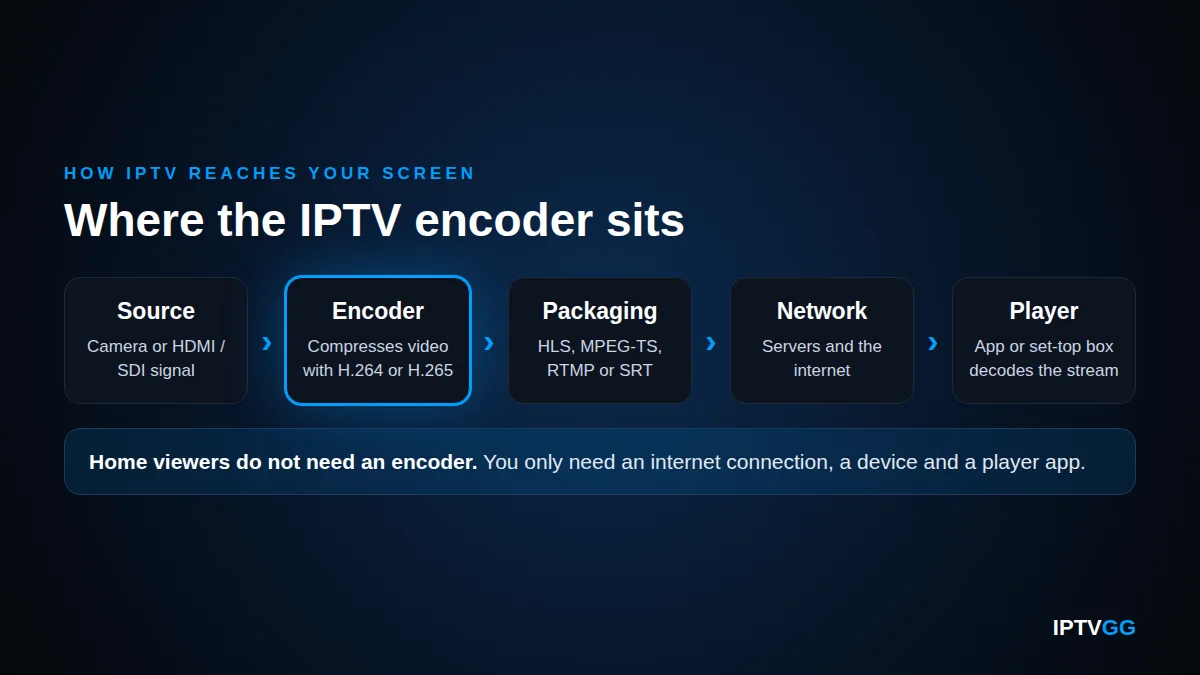
An IPTV encoder is only the first link. A stream passes through five steps before it reaches a screen.
- Source. A camera, satellite receiver, media player or computer delivers a video signal. It normally arrives over HDMI or over SDI, the cable standard used in professional broadcast.
- Compression. The IPTV encoder compresses the picture with a video codec, usually H.264/AVC or H.265/HEVC. The sound is compressed with an audio codec such as AAC.
- Packaging. Video and sound are placed in a container and sent with a streaming protocol, for example HLS, MPEG-TS over UDP or RTP, RTMP or SRT.
- Distribution. A middleware platform manages channels, users and the programme guide. A content delivery network (CDN) copies the streams to servers closer to the viewers.
- Playback. The app or set-top box at the viewer’s end requests the stream, decodes it and shows it on the screen.
Codecs: H.264 and H.265
Two video codecs dominate. H.264, also called AVC, is published by the International Telecommunication Union as Recommendation ITU-T H.264. Almost every TV, phone and streaming box can decode it. The newer H.265, also called HEVC, is published as Recommendation ITU-T H.265.
When HEVC was approved, the ITU announced that it would need about half the bit rate of H.264. This is why HEVC is common for 4K channels. The cost is more processing work at both ends. The viewer’s device must also support HEVC decoding, which older devices often do not.
Streaming protocols compared
After compression, the stream needs a way to travel. Each protocol fits a different part of the chain.
| Protocol | How it works | Typical use |
|---|---|---|
| HLS | Cuts the stream into short segments listed in a playlist and delivers them over ordinary HTTP. Can offer several quality levels. | Delivery over the internet to apps, smart TVs, phones and browsers |
| MPEG-TS over UDP or RTP | Sends a continuous transport stream in small packets. Lost packets are not sent again. | Managed local networks, for example in a hotel or on a campus |
| RTMP | An older protocol that keeps a constant connection to a server. | Sending a stream from an IPTV encoder to a streaming server |
| SRT | An open-source protocol with encryption and recovery of lost packets. | Sending live video over the public internet with low delay |
HLS is described in RFC 8216, HTTP Live Streaming. It lets a server offer the same programme at several bit rates, so the player can switch when the network changes. The MPEG transport stream is defined in Recommendation ITU-T H.222.0, and RTP in RFC 3550. The SRT Alliance presents SRT as open-source technology that keeps live video secure and the delay low, also on networks of uneven quality.
Hardware encoder or software encoder: what is the difference?
An IPTV encoder comes in one of two main forms. A hardware encoder is a dedicated box with video inputs. A software encoder is a program that runs on a computer or a cloud server. The right choice depends on the number of sources, the network and the budget.
| Feature | Hardware encoder | Software encoder |
|---|---|---|
| Form | A dedicated box or rack unit with HDMI or SDI inputs | A program on a computer or a cloud server |
| Strengths | Stable, built to run day and night, predictable delay | Flexible, easy to update, simple to scale up |
| Limits | Fixed number of inputs. A new codec can require new equipment. | Depends on the processor or graphics chip. Needs a capture device for HDMI or SDI. |
| Typical user | Hotels, venues and broadcasters with permanent channels | Small organisations, single events and cloud workflows |
Many set-ups combine both types. A box at the venue sends one high-quality stream to a server, and software in the cloud creates the versions that viewers receive.
Bitrate, resolution and latency: the basics
Three settings on an IPTV encoder shape almost everything the viewer notices. They always work against each other, so every stream is a compromise.
Bitrate
Bitrate is the amount of data the stream uses each second, measured in megabits per second (Mbps). A higher bitrate keeps more detail, but it needs more capacity on the sender’s line and on yours. If the bitrate is too low, the picture turns soft or blocky, most visibly in fast scenes such as football or ice hockey.
Resolution and frame rate
Resolution is the number of pixels in each frame: HD, Full HD (1080p) or 4K (Ultra HD). Frame rate is the number of frames per second. More pixels and more frames both need more bitrate. Many services produce the same channel in several versions, so the player can choose the one that fits the connection. This is called adaptive bitrate streaming.
Latency
Latency is the delay between the real event and the picture on your screen. Compression takes time, protocols that work with segments add more, and the player keeps a buffer as protection against short network problems. This is why a neighbour with an aerial may cheer for a goal before you see it.
Encoder, transcoder and decoder: which is which?
These three words are often mixed up. An IPTV encoder, a transcoder and a decoder do three different jobs at three different places in the chain.
| Unit | What it does | Where it sits |
|---|---|---|
| Encoder | Compresses a raw, uncompressed signal into a stream | At the source |
| Transcoder | Converts an already compressed stream to another codec, bitrate or resolution | In the middle, on a server or in the cloud |
| Decoder | Turns the compressed stream back into picture and sound | At the viewer: set-top box, smart TV, streaming stick, phone or app |
As a viewer, you only meet the decoder. A MAG box is a decoder. So is an Amazon Firestick, and so is an app such as IPTV Smarters Pro on a smart TV. The transcoder works out of sight. It is the reason one channel can exist in both a 4K version and a lighter version for a phone.
Who needs an IPTV encoder, and who does not?
The simple rule: you need an IPTV encoder if you send video to other people. You do not need one if you only watch.
Organisations that distribute their own content
- Hotels that run an information channel or show their own video on room TVs.
- Schools and universities that stream lectures and events across a campus.
- Sports clubs that stream their own matches, where the club holds the rights.
- Churches that send services to members who cannot attend.
- Businesses that broadcast staff meetings or run screens in shops and offices.
- Broadcasters and production companies that deliver channels they own or have licensed.
The common factor is rights. Under the Norwegian Copyright Act (åndsverkloven), the right to make films, series and broadcasts available to the public belongs to the rightsholders. Capturing TV channels and sending them on without permission is unlawful, whatever equipment is used. Our guide on whether IPTV is legal explains the background.
Home viewers in Norway
If you watch at home, you are at the end of the chain, far from any IPTV encoder. With a subscription you need three things:
- A stable internet connection. See our guide to internet speed for IPTV in Norway.
- A device, for example a Samsung or LG smart TV, an Amazon Firestick, an Android or Apple device, a Windows PC or a MAG box.
- An app such as IPTV Smarters Pro, XCIPTV or STB Emulator, with the login details from your provider. The installation guides show each step.
An IPTV encoder will not improve your picture at home. It works in the opposite direction, because it sends video out and does not receive it. Money is better spent on a good router, a network cable to the TV or a newer streaming device.
How do encoding choices upstream affect what you see?
You never touch the IPTV encoder, but you see its results every evening. Three typical viewer problems start with decisions made upstream.
Buffering
If a stream’s bitrate is higher than your connection can carry at that moment, the player’s buffer runs empty and the picture stops. Streams with several quality levels let the player step down instead of stopping. A stable connection at home still matters. Weak Wi-Fi is a common cause, so test with a cable first.
Picture quality
The resolution label does not tell the whole story. A 1080p stream with too little bitrate can look worse than a well-encoded stream at a lower resolution. You cannot change the encoding from your sofa. You can only make sure your own device, cable and TV settings do not reduce the quality further.
4K and HEVC support
4K streams are normally encoded in HEVC. Your device must be able to decode HEVC and your screen must be 4K. An older TV or stick may stutter, play sound without picture or refuse to start the channel. Check this before you blame the connection. Our 4K live IPTV guide lists what to look for.
IPTV encoder: frequently asked questions
Do I need an IPTV encoder to watch IPTV at home?
No. An IPTV encoder sends video out. It does not receive it. A home viewer in Norway needs a stable internet connection, a device such as a smart TV, a Firestick or a MAG box, and an app with login details from the provider. The encoding is already done before the stream reaches your home network.
What is the difference between an IPTV encoder and a set-top box?
They do opposite jobs. The encoder sits at the source and compresses a raw video signal into a stream. A set-top box is a decoder. It sits next to your TV, receives the compressed stream and turns it back into picture and sound. Most smart TVs and streaming sticks have a decoder built in.
Is H.265 better than H.264?
H.265 (HEVC) is more efficient. It can deliver similar picture quality at a clearly lower bitrate than H.264, which is why it is common for 4K. H.264 is more widely supported, especially on older devices. For a viewer, the practical question is simply whether the device can decode HEVC.
Can an IPTV encoder fix buffering on my TV?
No. Buffering at home is usually caused by the connection between the server and your screen, often weak Wi-Fi or a busy line, or by a device that struggles with the stream. Buying an IPTV encoder changes none of this. Test with a network cable, restart the router and check your speed first.
Is it legal to use an IPTV encoder?
An IPTV encoder is ordinary broadcast technology and is legal to own and use. What matters is the content. You may encode and distribute video that you own or have a licence for. Capturing TV channels and sending them on to other people without the rights is unlawful in Norway.
Does a hardware encoder give better quality than a software encoder?
Not automatically. Picture quality depends mainly on the codec, the bitrate and the settings, not on the type of product. A hardware encoder is often chosen for stability and constant operation. A software encoder is often chosen for flexibility and easy updates. Both can produce a good or a poor stream.
Next step: test the stream on your own screen
A viewer does not need an IPTV encoder, so the best test is practical. Try the stream on your own TV and your own connection. IPTVGG offers a 24-hour free trial with no card, and the trial login arrives on WhatsApp. You can look through the plans first. If the picture is stable, the plans start from €12.99 for one device for one month.
Questions about devices or set-up are answered in the FAQ, on WhatsApp at +212 601 675807 or through the contact page.