
M3U Playlist: What It Is, How to Load It and Common Errors
An M3U playlist is a plain text file that lists the channels a player should load, one entry after another. In IPTV it usually arrives as a single long link rather than a file you download. This guide explains what is inside an M3U playlist, the difference between M3U and M3U8, how to load one, and what the “not a valid M3U file” error actually means.
Key takeaways
- An M3U playlist is a list of stream addresses, nothing more.
- M3U8 is the same format saved in UTF-8, so it handles accents and non-Latin names.
- Almost every player accepts one, which makes it the universal fallback.
- It carries no TV guide of its own, so expect a flatter menu.
- “Not a valid M3U file” nearly always means the player received a web page instead of a playlist.
What is inside an M3U playlist
Open one in a text editor and there is no mystery to it. The file starts with a header line, then repeats a pair of lines for every channel: one describing the channel, one giving the address the player should open.
That is the whole format. It was written in the 1990s for music players (the M3U format is still a plain-text file today) and was never designed for television, which explains both its strengths and its limits. It is simple enough that every player supports it, and too simple to carry a schedule, categories or artwork on its own.

M3U or M3U8: what is the difference?
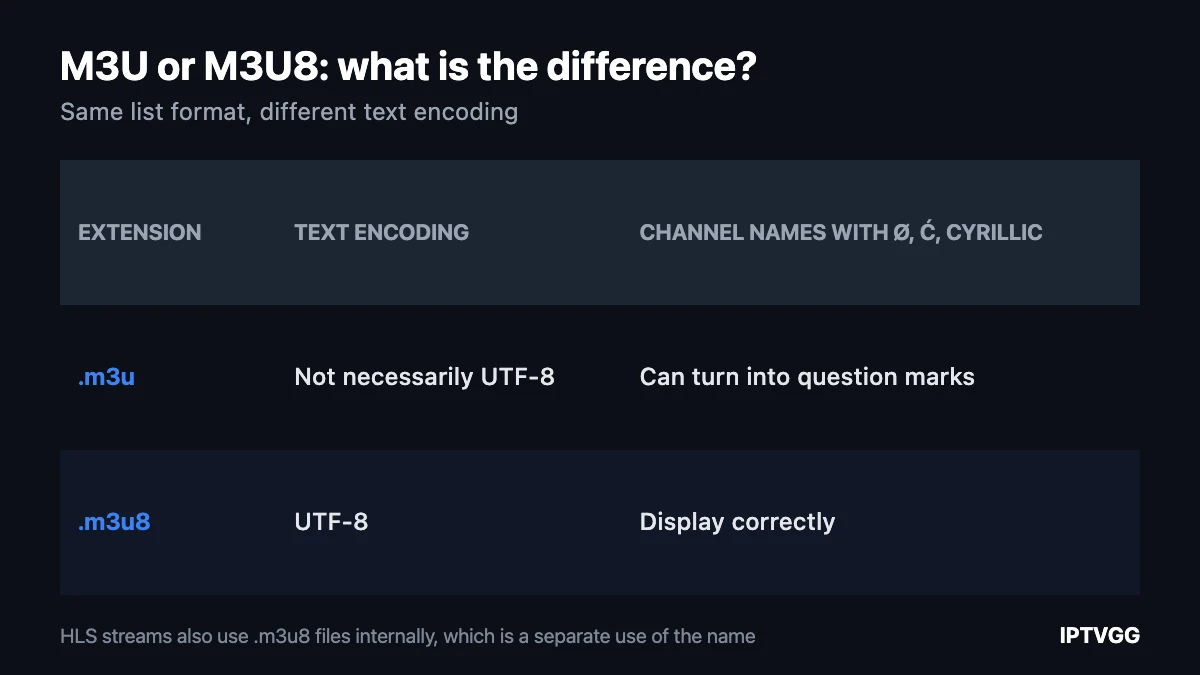
Less than people expect. Both are the same list format. The .m3u8 extension means the file is saved in UTF-8 text encoding, so channel names with Norwegian, Arabic or Cyrillic characters display correctly instead of turning into question marks.
In streaming there is a second use of the name that causes confusion. HLS, the technology behind most live streams, also uses .m3u8 files internally to list the small video segments that make up a channel. Those are generated by the server and are not something you enter anywhere. If a link you were given ends in .m3u8, it is almost certainly still your playlist, not an internal segment list.
M3U playlist, Xtream Codes or portal URL?
Three ways to connect, and your device usually decides which one you use.
| Method | What you enter | TV guide included | Menu quality |
|---|---|---|---|
| M3U playlist | One long link | Often not | Flat list |
| Xtream Codes | Server, username, password | Usually yes | Categories and posters |
| Portal URL | One address tied to a MAC | Yes | Built into the box |
If your app offers a choice, the username and password route is usually the better one, for the simple reason that it brings the schedule with it. Our Xtream Codes guide covers that method, and the portal URL guide covers MAG boxes. Keep the M3U playlist for players that accept nothing else.
How to load an M3U playlist
- Copy the link exactly as it was sent, including
http://and anything after the question mark. - In your player, choose to add a playlist by URL rather than by file.
- Paste the link. Do not retype it: these addresses are long and a single wrong character breaks them.
- Save and wait. A large playlist can take a minute to parse on an older device.
- If the player offers a separate field for a TV guide, that is where an EPG address goes, not the playlist link.
On a phone it is worth sending the link to yourself in a message and pasting from there, rather than typing it on a remote control keyboard. Device-by-device steps are in our installation guides.
Why you see “not a valid M3U file”
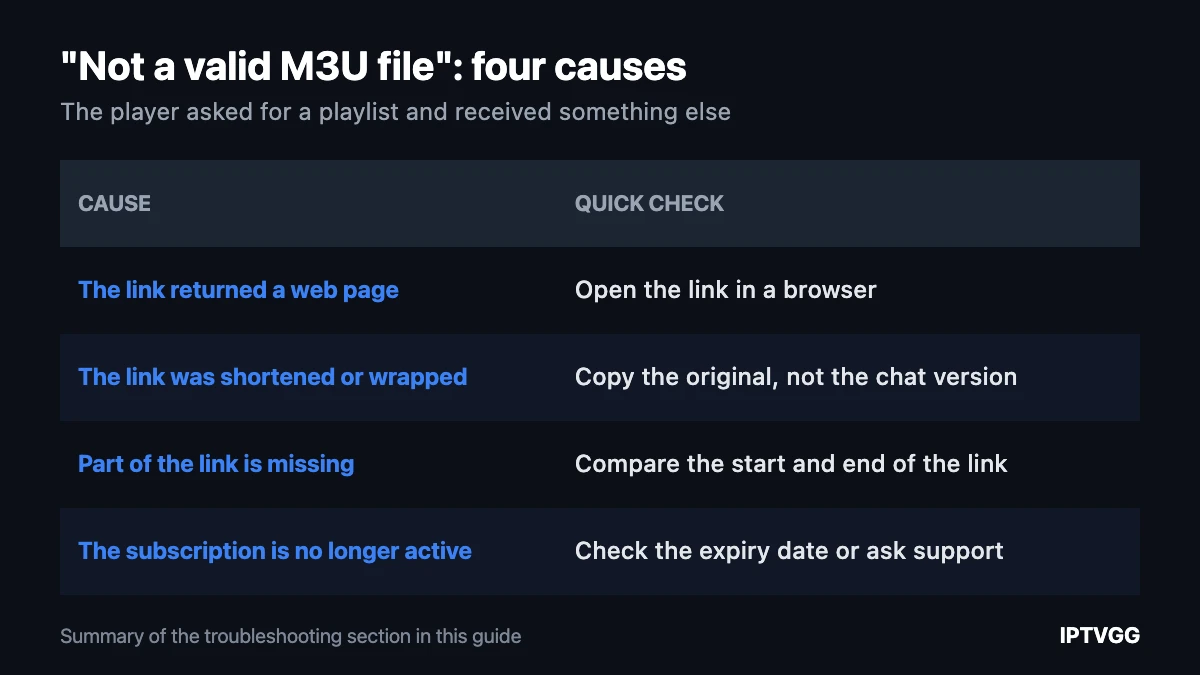
This error is almost always literal: the player asked for a playlist and received something else. Four causes cover nearly every case.
The link returned a web page
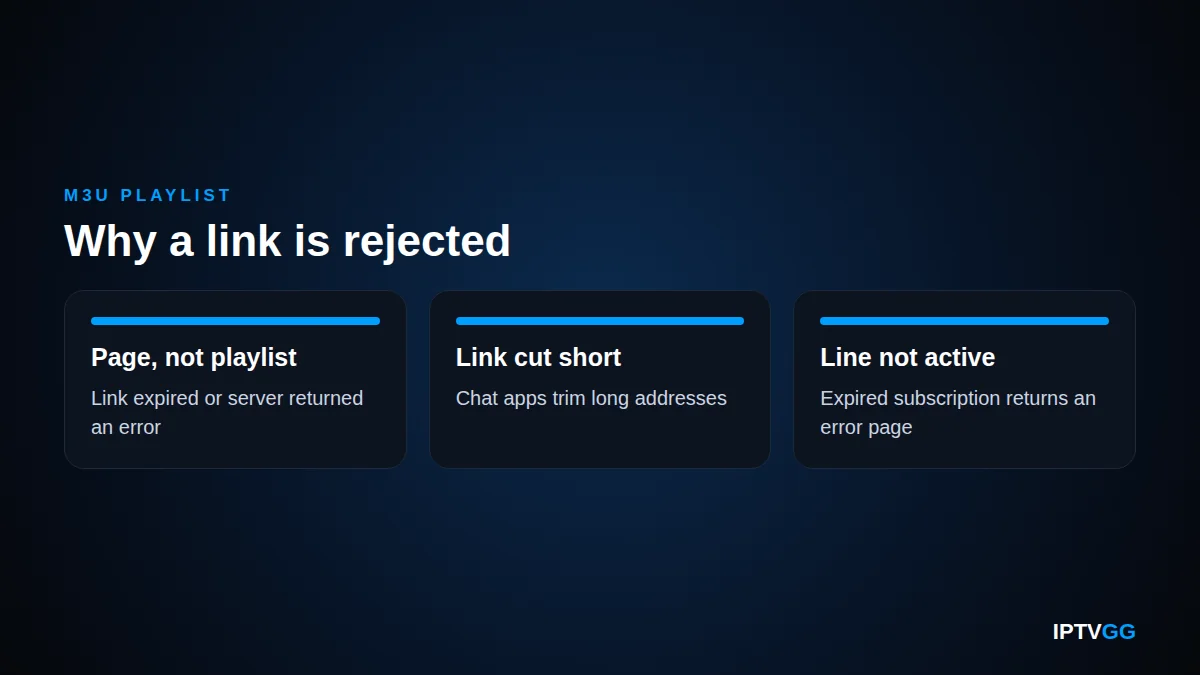
If the address has expired or the server answered with an error, the player receives an HTML page and reports that it is not a playlist. Open the same link in a browser. If you see a page of text rather than a file download, that is your answer.
The link was shortened or wrapped
Messaging apps and email clients cut long links or turn them into tracking redirects. Always copy the original, not the version that appears in a chat bubble.
Part of the link is missing
Everything after the question mark matters. People often copy up to the first space or miss the tail when selecting on a phone. Compare the beginning and the end against what you were sent.
The subscription is no longer active
An expired line answers with an error page rather than a playlist, which the player reports the same way. If the link worked last week and not today, check the account state before changing any settings.
Why free M3U playlist links do not work
Searches for free playlists are common and the result is predictable. These links point at someone else provider account. They are rate limited, they are shared by thousands of people at once, and they stop working within hours when the owner notices.
There is a safety side as well. Pages that publish free playlists are a well known route for spreading modified apps and for logging the IP addresses of everyone who connects. If a page offers a free link but asks you to install something first, close it.
The link worth using is the one issued to you. Ours is sent on WhatsApp after an order, and you can test everything first with the 24-hour free trial, which needs no card.
Keep the link private
An M3U address contains your credentials inside it, which is why these links are so long. Anyone who copies it can use your line, and most servers drop both sessions when two run at once. Do not post it in groups or forums, and if you think it has leaked, ask support to issue a new one.
Playback problems are not playlist problems
Once the list loads, the playlist has done its job. Stuttering, freezing and long channel changes come from the connection between your home and the server, not from the file. A cable instead of Wi-Fi fixes more of this than any setting. Our speed test tells you in ten seconds whether your line can carry HD or 4K, and the speed guide has the numbers per screen.
M3U playlist: frequently asked questions
Where do I get my M3U playlist link?
From your provider after you order. We send it on WhatsApp and by email. If you cannot find it, message support rather than searching for a replacement online.
Can I open an M3U playlist on a computer?
Yes. Desktop media players accept a playlist by URL, which makes a computer a quick way to test whether a link works at all before you set up a TV.
Why does my M3U playlist have no TV guide?
Because the format does not carry one. Some players accept a separate guide address in their own field, and some providers supply one. If the guide matters to you, the username and password login is the easier route.
Does an M3U playlist expire?
The link stays valid while the subscription is active. When the period ends, the address stops returning a playlist and players report it as invalid.
Can I edit an M3U playlist to remove channels?
You can, since it is a text file, but most people do not need to. Marking channels as favourites inside the app achieves the same thing and survives a refresh of the list.
Is an M3U playlist safe to use?
The format itself is just text and carries no code. The risk lies in where a link comes from and what a page asks you to install alongside it.
Test it on your own screen
Whether you use a playlist, a username and password or a portal, the only real test is an evening of normal viewing. Our trial lasts 24 hours and needs no card: start with the free trial or compare the plans.
Want a playlist link that actually works?
Get your own link on WhatsApp and test it for 24 hours before you pay anything.